01
Fragile DIY projects
Half-finished GitHub repos that need firmware skills, the right Arduino board and hours of debugging before anything moves.

 Early Access
SimuRC-Pro turns your Windows PC into a software ELRS remote. Use the wheel and pedals of your rig, or a standard gamepad, to drive compatible RC vehicles.
ELRS · READY
Professional drivers already trust sim racing to prepare for reality.
We asked ourselves the opposite question.
What if sim racing could directly control reality?
Existing solutions push you into one of three frustrating corners.
Half-finished GitHub repos that need firmware skills, the right Arduino board and hours of debugging before anything moves.
High-end RC transmitters that cost as much as a complete sim wheel, just to bridge what you already have.
Proprietary kits where the radio, the app and even the car must come from the same vendor. Switch once, locked forever.
SimuRC-Pro reads your sim peripherals, converts inputs into ELRS commands and sends them to the car. Four blocks, one cable, standard hardware.
Logitech, Fanatec, MOZA, Thrustmaster, Simagic. Use the rig you already own.
Software control layer. Profiles, calibration, safety limits, FFB tweaks.
Off-the-shelf USB ELRS transmitter. No proprietary box.
Or your own RC radio through its trainer port, with one cable from the PC Next update. 4-in-1 multi-protocol modules .
Any car, buggy or crawler with a separate receiver, steering servo and speed controller: fit an ELRS receiver (about 10€), or keep the stock one through your radio's trainer port. Will my car work?
The control layer lives in software, on the PC you already have.
Drive RC with the wheel you already bought. No extra controller to buy.
Save 500€+ on a high-end RC remote. A standard ELRS USB module costs around 30€.
Pick your own module and receiver (ELRS RX from ~10€). Standard ELRS, no vendor lock-in. Already own a radio with a trainer port? Use it Next update.
Steering, throttle, expo, limits. Up to 8 car profiles, exported or imported as a file to back up or share.
Built solo by an engineer who actually drives sim and RC.
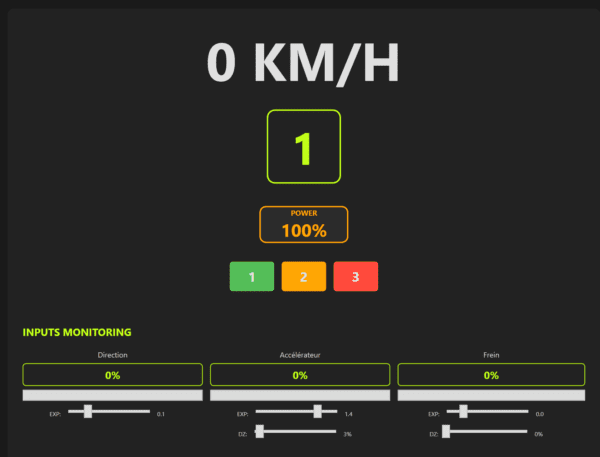
Live data ready for your existing SimHub dashboards: speed, gear, RPM, throttle, brake.

Virtual 6-speed gearbox with a realistic rev limiter you feel in the wheel. Live engine sound: 4-cylinder, V8, Formula 1 or RC nitro, following the throttle and every shift.
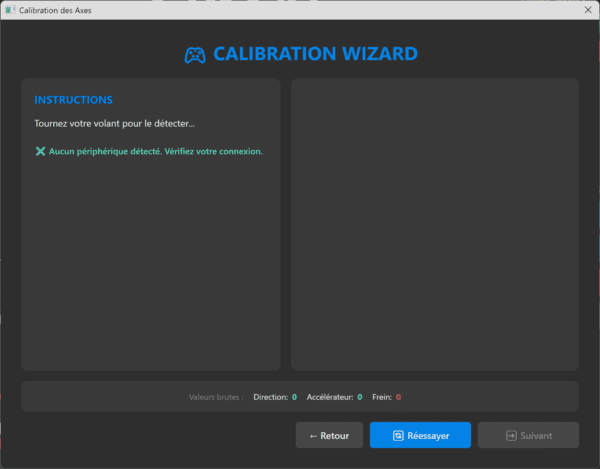
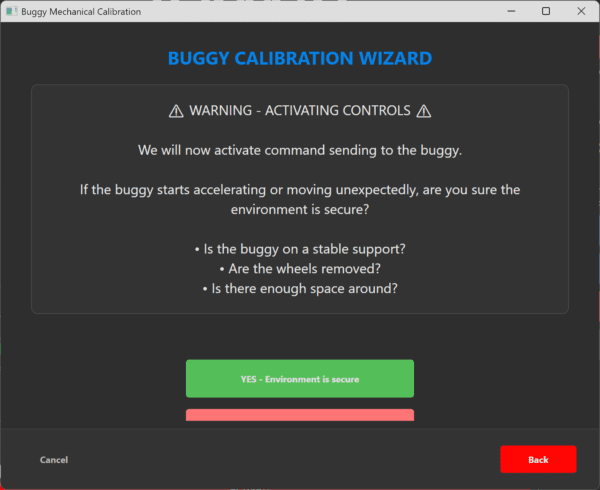
One screen, 4 steps: equip, pair, calibrate, video. Then a big DRIVE button. The full expert mode stays one click away, with the same settings.
Real specs from the running build. No marketing approximations.
10 ms intervals between sim input and ELRS frame.
Wheels, pedals, joysticks, gamepads. If Windows sees it, SimuRC-Pro maps it.
One per car, named, with its own calibration, button mapping and power. Export / import to share.
Beginner, intermediate, expert, or your own custom level. Whole pedal range remapped.
Plug your existing SimHub dashboards.
OpenIPC receiver (beta). HDMI / USB capture for Walksnail, DJI, HDZero or analog receivers Next update
Trainer port driven from the PC audio output or the RP2040 bridge. First test passed on a Spektrum DX6i Next update
Real screenshots from the running build, not mockups.
Has a Fanatec or MOZA rig that sleeps between iRacing sessions. Wants to drive something real for an hour.
Tired of switching between two control philosophies. Wants one cockpit, two driving modes.
Want a software-led control layer for rentals, training and events without locking into a single car brand.
Need impressive driving stations that look pro on a stand. PC + cockpit + real RC car beats any tablet demo.
Experimenting with remote-piloted vehicles for off-peak hours, demos and corporate sessions.
Test prototype vehicles or teach control engineering without writing a custom firmware first.
For commercial venues. The 29€ Early Access license covers personal, non-commercial use only.
Portal Racers Pro is the venue-grade package. It pairs SimuRC-Pro Station licences (one per cockpit) with Portal Manager, the central operator application. Multiple driving stations supervised from a single screen at one location. The exact number depends on your local radio environment and the available 5 GHz channels.
The recommended architecture is one small PC per driving station. No GPU, no high-end CPU: SimuRC-Pro runs on a mini PC or a basic laptop. Each station owns its ELRS link, its profile and its telemetry, and Portal Manager supervises them from a separate operator machine. One PC per station keeps things clean: isolated failures, independent calibration, and no shared USB or radio bottleneck.
An exclusive early-adopter offer with preferential 12-month pricing is reserved for the first confirmed venue operators.
A community is growing around SimuRC-Pro to share ideas and follow the development in progress. Come and join us on Discord.
Six honest checkboxes versus the alternatives.
In development, not committed yet:
• Real force feedback derived from data actually measured on the buggy.
• Driving a G-seat through SimHub from that same real telemetry.
| Feature | SimuRC-Pro | High-end RC radio | Closed sim-to-RC kit | DIY GitHub project |
|---|---|---|---|---|
| Uses your existing sim hardware | Yes | No | Partial | Yes |
| No dedicated RC radio purchase | Yes | No | No | Yes |
| Open ELRS stack | Yes | Partial | No | Yes |
| PC-side calibration & profiles | Yes | Partial | Partial | No |
| Multi-station roadmap | Yes | No | Partial | No |
| Vehicle-agnostic | Yes | Yes | No | Yes |
A focused tool, not a do-it-all platform. The scope is deliberately narrow so what ships actually works.
For the standard setup, yes. SimuRC-Pro outputs to a standard USB ELRS module of your choice. Any off-the-shelf ELRS transmitter module works. We document the recommended models in the product page.
Already own an RC radio with a trainer port? Next update The next update drives it from the PC with a single cable (audio output or RP2040 bridge), and your car keeps its own receiver. 4-in-1 multi-protocol modules (Jumper JP4IN1, iRangeX IRX4) for other brands' receivers are : come and test them with us on Discord.
If your car has a separate receiver, steering servo and speed controller (most hobby-grade cars), yes: plug in an ELRS receiver (about 10€) instead of the stock one. If your radio has a trainer port, the next update also lets you keep the stock receiver.
Toy cars where the receiver and the speed controller are a single board cannot be converted. Not sure? Post a photo of the electronics on Discord.
Any DirectInput-compatible Windows wheel and pedal set: Logitech G29/G923, Fanatec, MOZA, Thrustmaster, Simagic, plus standard joysticks and gamepads. Xbox controllers are already tested in early use; PS4/PS5 pads work via DirectInput. If Windows sees the device, SimuRC-Pro can map it.
The control loop runs at 100 Hz. End-to-end latency depends on your full hardware chain. We measure it honestly per setup rather than publishing a flattering figure.
Yes, from your own FPV kit. The app includes an OpenIPC video receiver (beta). Next update The next update adds HDMI or USB capture: Walksnail, DJI, HDZero or analog receivers are shown in a SimuRC-Pro window, through their USB video output or an HDMI-to-USB dongle. No VLC or OBS needed. You can also keep your goggles.
Yes, natively. SimuRC-Pro broadcasts live telemetry to SimHub: speed, gear, RPM, throttle, brake, ELRS outputs, calibration values. Your existing SimHub dashboards work out of the box.
Yes. The free Windows demo lets you test connection, calibration and basic control with functional limitations. No credit card. Once you confirm it works on your setup, the Early Access license unlocks full functionality.
One-time payment of 29€ for the Early Access personal license, valid on up to 3 PCs (or 3 reactivations if you upgrade your machine). You get current and Early Access updates. Pricing may rise once the product reaches v1.0 stable.
Not under the 29€ license. The personal license is non-commercial. Paid sessions, venues and multi-customer operation are covered by Portal Racers Pro, a separate venue offer that pairs SimuRC-Pro Station licences (one per cockpit) with Portal Manager (central operator app). Talk to the founder on WhatsApp or email contact@hsimracing.com.
The product works today and is actively developed. New features ship regularly. Early Access pricing reflects that reality, the price will rise once we reach v1.0 stable.
Up to 8 independent buggy profiles. Create and name one per car, each with its own calibration, button mapping, mechanical limits and power preferences. Switch between them in one click. Export a profile to a file and import it back, to back up your setup or share it.
Not today. SimuRC-Pro is Windows 10/11 only. A cross-platform build is not on the short-term roadmap.
SimuRC-Pro is more than a piece of software: it's a hobby with a community that loves to share. A lot of our users hang out on our Discord, comparing setups, swapping tips and helping each other out. One of them took his rig to an indoor RC track, ran it for six hours straight and filmed the whole session. Here's what he had to say.
“The SimuRC software is freaking amazing. I ran it for about six hours at the track, and the only issue the whole time was me unplugging my own USB cable.” A SimuRC-Pro user, filmed at an indoor RC track
“An all-in-one plug-and-play piece of software that uses all of your own existing hardware. You don't have to code anything, script anything or wire anything.”
“It feels like I'm just driving a real car. I'm using my wheel for steering, gas pedal and brake pedal, just like you would in a real car.”
“I ran the software for five to six hours straight. One issue the whole time, and it was my own fault: I'd unplugged my wheel.”
“All kinds of settings. I limited the power to 40% indoors. Take it outside and I could really crank up the speed and dial in everything.”
Free limited demo · 29€ Early Access license · 3 PC activations · No subscription, no proprietary hardware lock-in.
Love the project? You can also grab a supporter sticker pack. Totally optional.
Question 1/6